
JSON-LD for SEO: Why It's the Recommended Format and How to Implement It


Table of Contents +
JSON-LD for SEO is Google's recommended structured data format. See how it compares to Microdata and RDFa, and how to implement and validate it.
If you want search engines and AI answer engines to understand what your content actually means, you have three sanctioned ways to add structured data schema markup to a page: JSON-LD, Microdata, and RDFa. All three are valid. All three encode the same schema.org vocabulary. And all three are recommended for the same job - turning plain HTML into machine-readable meaning that can fuel rich results and AI citations.
Here's the catch: they don't work the same way under the hood, so choosing between them is a real decision with real consequences. Pick the wrong one and every content update risks corrupting your page layout, your markup drifts out of sync with your visible content, and you end up looping in a developer for changes that should take seconds. Understanding json-ld for seo - and how it stacks up against the alternatives - starts with knowing what each format actually is.
What Are the Three Main Schema Markup Formats?
The three main schema markup formats are JSON-LD, Microdata, and RDFa. All three implement the schema.org vocabulary that tells search engines what your content means, but they differ in where the markup lives: JSON-LD sits in a separate script block, while Microdata and RDFa embed directly inside your visible HTML tags.
Structured data schema markup is a shared vocabulary - schema.org - that describes the entities on your page: an article, its author, a product, a set of FAQs, a breadcrumb trail. Search engines read that description to build richer result cards with publication dates, author names, and images, and pages carrying valid, correctly-structured markup become eligible for the enhanced result formats that plain pages never qualify for. Before comparing formats, it helps to know what each one actually is.
JSON-LD: a separate script block
JSON-LD, short for JavaScript Object Notation for Linked Data, expresses your structured data as a self-contained block of JSON that lives in a script tag in the page head or body. It sits apart from the content a visitor sees - the markup and the visible HTML never touch each other.
Microdata: attributes inside your HTML
Microdata annotates your existing HTML by adding attributes - itemscope, itemtype, itemprop - directly to the tags that already render your content. The structured data and the visible content share the same markup, so a single element does double duty: showing text to readers and describing it to machines.
RDFa: HTML attributes with a linked-data lineage
RDFa, or Resource Description Framework in Attributes, works much like Microdata, layering its own set of attributes onto visible HTML tags. It comes from the broader linked-data and semantic-web tradition and is more expressive across vocabularies, which is part of why it survives as a valid option even though it is the least common of the three on the modern web.
All three exist because they solved the same problem at different moments in the web's history, and search engines still read all three. Your pillar guide to structured data for SEO covers what these schema types accomplish; the question here is which syntax you should write them in.
GetTraffic writes and publishes SEO content automatically - articles that build authority and drive organic traffic - start your free trial.
JSON-LD vs. Microdata vs. RDFa: How Do They Compare?
JSON-LD, Microdata, and RDFa differ most in where the markup lives and how much risk that placement creates. JSON-LD stays isolated in a script block; Microdata and RDFa weave attributes through your visible HTML. That single structural difference drives everything else - implementation effort, layout safety, automation fit, and how each format holds up in template-driven publishing.
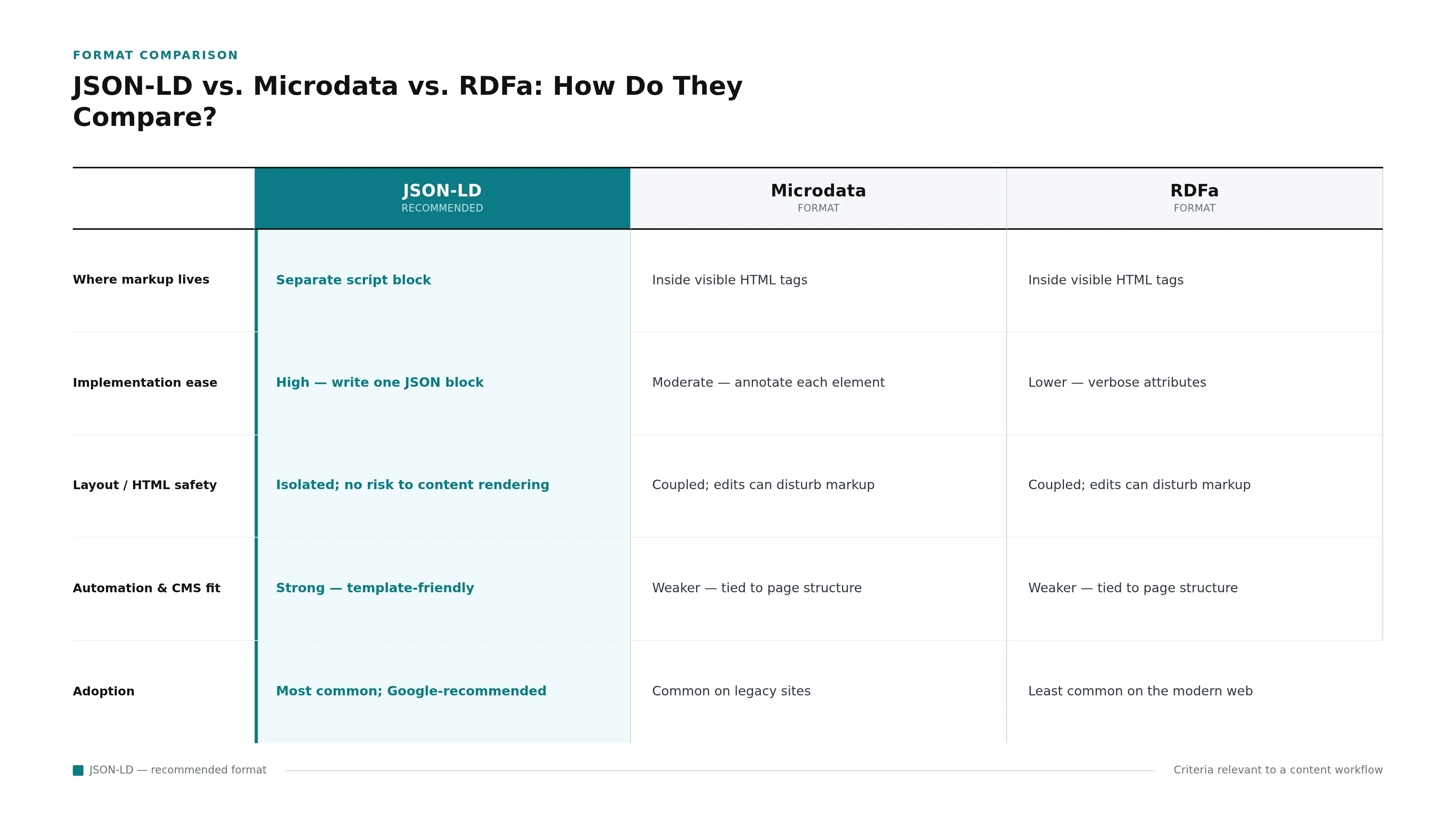
The table below lays out the tradeoffs across the criteria that matter most when you're choosing a format for a content workflow rather than a one-off page.
| Criterion | JSON-LD | Microdata | RDFa |
|---|---|---|---|
| Where markup lives | Separate script block | Inside visible HTML tags | Inside visible HTML tags |
| Implementation ease | High - write one JSON block | Moderate - annotate each element | Lower - verbose attributes |
| Layout / HTML safety | Isolated; no risk to content rendering | Coupled; edits can disturb markup | Coupled; edits can disturb markup |
| Automation & CMS fit | Strong - template-friendly | Weaker - tied to page structure | Weaker - tied to page structure |
| Adoption | Most common; Google-recommended | Common on legacy sites | Least common on the modern web |
Implementation effort and HTML safety
Writing JSON-LD means composing one structured block and dropping it into the template - no need to touch the surrounding HTML. Microdata and RDFa require you to annotate individual elements throughout the page, which is more tedious and more fragile: rework the layout and you risk stranding or breaking the attributes. This coupling is the practical heart of the microdata vs JSON-LD decision.
Why does format choice matter for AI search?
Format choice is no longer only about traditional rich results. Structured data is one of five pillars of optimization for AI answer engines, alongside entity recognition, authoritative sourcing, content structure, and intent-driven design, according to research on the shift to generative search. And schema - FAQ and author markup in particular - correlates with higher citation rates in systems like ChatGPT, Perplexity, and Google's AI Overviews. Whichever format you choose has to be one you can maintain consistently across every page, because inconsistent or broken markup helps no engine.
Why Is JSON-LD the Recommended Format?
JSON-LD is the recommended format because it separates structured data from the HTML a visitor sees, which makes it safer to update, easier to generate automatically, and a natural fit for template-driven publishing. Google explicitly recommends it over Microdata and RDFa for exactly these reasons.
The core advantage is isolation. Because JSON-LD lives in its own script block, updating your markup never touches the elements that render your content - so there's no risk of corrupting your page layout when content and markup change independently. That property is exactly why Google recommends JSON-LD for CMS-driven publishing, where pages are assembled from templates rather than hand-edited one at a time.
Isolation removes layout risk
With Microdata and RDFa, a copy edit and a markup edit happen in the same tags, so one can break the other. JSON-LD sidesteps this entirely: your visible content and your structured data evolve on separate tracks. For a content team shipping frequent updates, that separation is the difference between a five-second change and a full QA cycle.
It automates cleanly across templates
Because a JSON-LD block is just structured data injected into a template, a CMS can build it from fields it already holds. A standard blog post, for instance, can carry a complete BlogPosting schema assembled from its title, author, and publish date with no manual effort - our BlogPosting schema implementation guide covers the full field set. Multiply that across a template and every article ships consistent markup automatically.
It's the format Google points you toward
Beyond the technical merits, Google names JSON-LD as its preferred format for site owners adding structured data. Following the recommended path means your markup aligns with how Google's documentation, testing tools, and examples are written - which lowers friction every time you extend or debug your implementation.
How Do You Implement JSON-LD in Your Workflow?
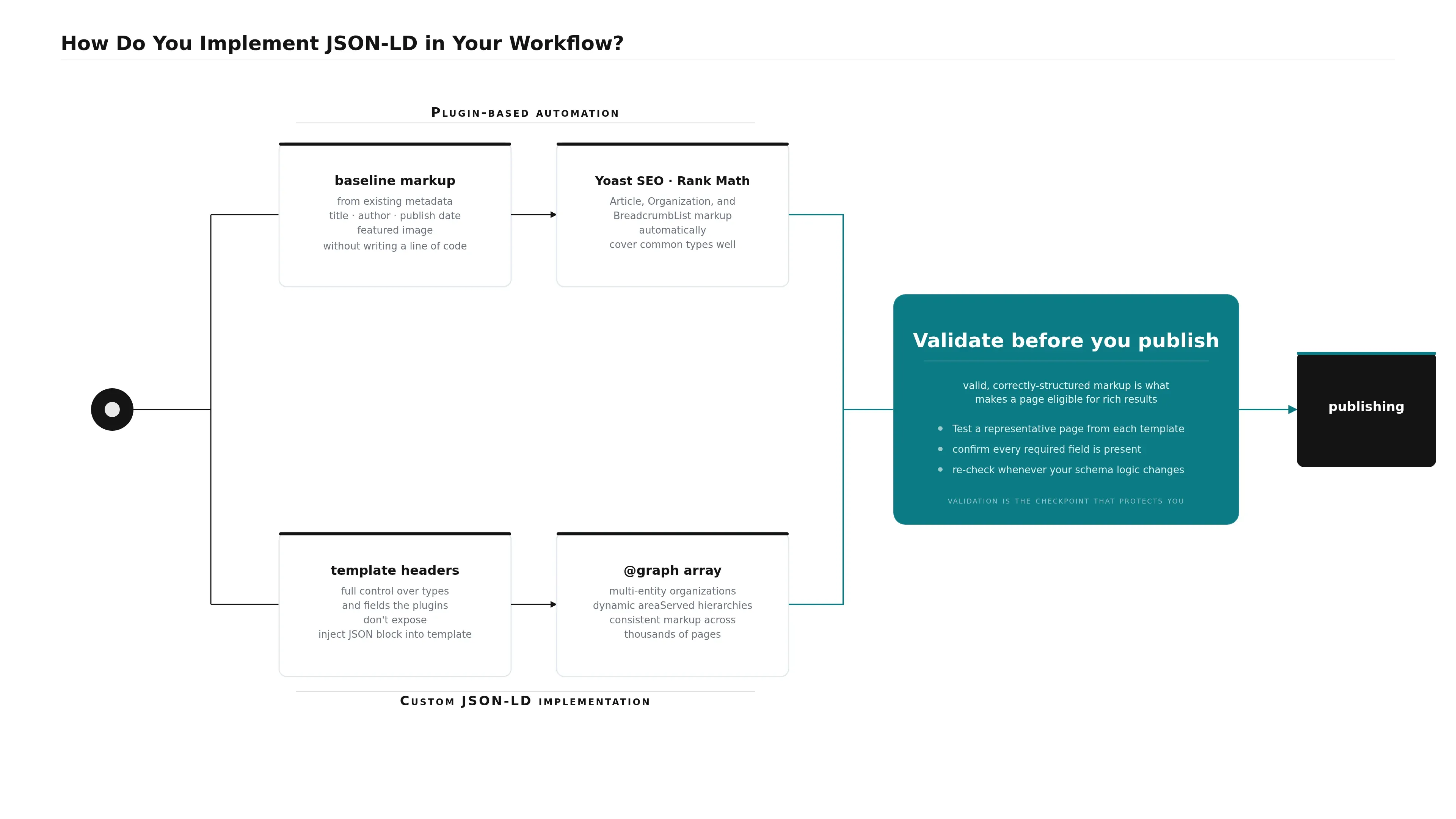
You have two paths to JSON-LD: plugin-based automation for standard content, or custom implementation for full control. Most publishers start with a CMS plugin that generates baseline markup from existing metadata, then move to custom templates only when they need advanced fields. Either way, validate the output before publishing - that step is non-negotiable.
Plugin-based automation
For most blogs and standard content, a plugin handles JSON-LD without you writing a line of code. On WordPress, Yoast SEO and Rank Math generate baseline Article, Organization, and BreadcrumbList markup automatically, assembling each schema from the title, author, publish date, and featured image you already enter. The tradeoff: these plugins cover common types well but limit advanced fields such as knowsAbout or areaServed. For standard publishing, that ceiling rarely matters.
Custom JSON-LD implementation
When you need types or fields the plugins don't expose - multi-entity organizations, dynamic areaServed hierarchies, or several schema types stacked in one @graph array - custom implementation via template headers gives you full control. Because JSON-LD is just a JSON block injected into the template, your CMS can populate JSON-LD examples for any content type from the same data it already stores, generating consistent markup across thousands of pages without per-article handwork.
Validate before you publish
Whichever path you take, validation is the checkpoint that protects you: valid, correctly-structured markup is what makes a page eligible for rich results, while malformed markup silently disqualifies it. Test a representative page from each template, confirm every required field is present, and re-check whenever your schema logic changes. Our guide to validating schema markup before publishing walks through the tools and the errors worth catching.
SEO content that ranks, written and published for you
GetTraffic creates authority-building content clusters for your business. No writing, no freelancers, no content calendar. Agency-quality results at 91% less cost.
Start My Free TrialWhen Might Microdata or RDFa Be a Better Choice?
Microdata or RDFa can be the pragmatic choice when a legacy system or platform constraint makes JSON-LD impractical. If your CMS or template engine can't inject a script block, or you're maintaining an older codebase already marked up with inline attributes, switching formats mid-stream may cost more than it returns. The format that ships correctly beats the theoretically ideal one.

A few situations genuinely favor the inline formats:
- Locked-down templates. Some hosted platforms or rigid template systems won't let you add a script block to the head or body. If inline attributes are the only markup you can inject, Microdata or RDFa is better than no structured data at all.
- Existing inline markup. If a site is already fully annotated with Microdata and rendering correctly, ripping it out to migrate to JSON-LD carries risk for little gain. Working, valid markup in any format still communicates meaning to search engines.
- Broad vocabulary needs. RDFa's linked-data lineage makes it more expressive across multiple vocabularies, which occasionally matters for specialized publishing outside mainstream SEO use cases.
These are exceptions, not the rule. For new implementations on modern, template-driven platforms, the reasons to reach for JSON-LD hold in nearly every case. But recognizing when a constraint outweighs the ideal is part of making a realistic decision rather than a dogmatic one.
The three formats all do the same job, but they don't carry the same risk. JSON-LD keeps your structured data out of your visible HTML, which makes it safer to update, cleaner to automate, and the format Google points site owners toward - while Microdata and RDFa remain valid fallbacks for the legacy cases where a script block isn't an option.
Once you've settled on JSON-LD, the work shifts from choosing to executing: generate it from your templates, and validate every template before it ships. For teams publishing at scale, platforms like GetTraffic generate and validate JSON-LD automatically inside the publishing workflow, so markup goes out correct without a post-publish developer handoff.
Frequently Asked Questions
What is the difference between Microdata and JSON-LD?
Microdata embeds structured data directly into your visible HTML using attributes like itemprop, so the markup and the content share the same tags. JSON-LD keeps the markup in a separate script block, isolated from what visitors see. Both express the same schema.org vocabulary, but JSON-LD's separation makes it safer to update and simpler to automate - which is why Google recommends it.
Can I use more than one schema type on a single page?
Yes. JSON-LD supports schema stacking - placing multiple types on one page, either as separate script blocks or combined in a single @graph array that links related entities together. A blog post might carry Article, Organization, BreadcrumbList, and FAQPage markup at once. Keep it focused, though: adding more fields than your content genuinely supports adds maintenance overhead without adding value.
Do WordPress plugins generate JSON-LD automatically?
Yes. Plugins such as Yoast SEO and Rank Math generate baseline JSON-LD for Article, Organization, and BreadcrumbList types automatically, pulling from metadata you already enter - title, author, publish date, and featured image. For advanced fields or custom schema types beyond the standard templates, you'll usually need custom template development or a platform with native, configurable schema generation.
How do I validate JSON-LD before publishing?
Run your markup through a schema validation tool before it goes live to confirm the syntax is correct and every required field for your chosen type is present - missing or malformed markup disqualifies a page from rich result eligibility. Validate a representative page from each template, not every page, and re-check whenever you change your schema logic or template structure.
References
Get your business on page 1 of Google
Get your business found on Google - SEO content written and published automatically.
Start My Free Trial7-day free trial