
How to Validate Schema Markup Before Publishing


Table of Contents +
- Why Does Schema Validation Matter Before You Publish?
- What Does Schema Validation Actually Check?
- Which Schema Validation Tool Should You Use?
- How Do You Validate Your Schema Markup, Step by Step?
- Common Validation Errors and How to Fix Them
- How Do You Build Validation Into Your Publishing Workflow?
- Frequently Asked Questions
- Sources
Validate schema markup with the Rich Results Test and Schema.org Validator to catch silent errors before publishing and stay eligible for rich results.
You shipped a batch of articles with schema markup weeks ago, and nothing happened. No rich result cards in Search, no enhanced snippets, no sign that Google or any AI engine noticed the structured data you carefully added. Then Search Console starts flagging errors-long after the pages went live-and you realize the markup was broken the whole time. If that sounds familiar, the missing step is almost always the same: nobody stopped to validate schema markup before publishing.
Broken markup fails silently. Crawlers don't warn you at publish time; they simply skip the invalid data and move on, leaving your content ineligible for the rich results and AI citations it was structured to earn. Every article you ship without a validation gate is a quiet gamble-and the cost compounds across a content library you can't easily re-audit after the fact. The fix is a repeatable pre-publish check, and this guide walks through exactly how to run it.
Why Does Schema Validation Matter Before You Publish?
Validation matters because invalid schema markup fails silently-search crawlers ignore malformed data without any error, so your page loses rich result eligibility and AI citation probability without warning. Testing before you publish is the only reliable moment to catch those failures while they're still cheap to fix.
Structured data is one of five critical pillars for content visibility across both traditional and generative search systems, according to integrated research on SEO, GEO, and AEO. That makes the markup worth getting right-and if you're still building your implementation, our complete guide to structured data for SEO covers the foundations this article assumes you already have in place.
The trap is that valid-looking markup and valid markup are different things. Invalid or malformed markup is silently ignored by crawlers, so content quietly becomes ineligible for rich results and its AI citation probability drops-no error message, no ranking penalty, just absence. Adding well-formed Schema.org metadata, by contrast, is associated with significantly higher chances of being recognized or cited by AI chat systems like ChatGPT, per a 2026 analysis of JSON-LD metadata. Validation is what stands between those two outcomes.
The cost also compounds. A single broken article is a missed opportunity; a broken template pushes the same defect across every page that uses it, and you rarely notice until a content audit months later surfaces a whole library that never qualified for anything. Catching the error at publish time keeps it contained to one draft instead of one theme.
GetTraffic writes and publishes SEO content automatically - articles that build authority and drive organic traffic - start your free trial.
What Does Schema Validation Actually Check?
Schema validation checks two distinct things: syntax-whether your JSON-LD is well-formed code a parser can read-and semantics-whether the properties and values actually match Schema.org definitions. A file can be perfect JSON yet semantically wrong, so both checks matter. Passing one without the other still leaves markup crawlers may reject.
Understanding the difference tells you how to read a validator's output, because the two error types have different causes and different fixes.
Syntax errors: is the code well-formed?
Syntactic validation checks whether your JSON-LD parses at all. A missing comma, an unclosed bracket, a stray quotation mark, or an incorrectly escaped character breaks the entire block-parsers reject it wholesale rather than salvaging the valid parts. These are the fastest errors to catch and fix, because any validator refuses the input outright and points at the line where parsing failed. JSON-LD is the format Google recommends precisely because it lives in its own script block, separate from your visible HTML, so a syntax slip doesn't corrupt page layout the way inline microdata can.
Semantic errors: do the values mean what Schema.org expects?
Semantic validation checks the meaning. Your JSON might parse cleanly while still using a property that doesn't exist on the type you declared, supplying a date where a URL belongs, or nesting a value the vocabulary doesn't permit. Article and BlogPosting markup are frequent offenders here-see our BlogPosting schema implementation guide for the exact fields each type expects and the types those fields require. Semantic errors are why "it's valid JSON" is never the same claim as "it's valid schema."
Which Schema Validation Tool Should You Use?
Use Google's Rich Results Test to check whether markup qualifies for Google's specific rich result features, and the Schema.org Validator to check generic compliance with the full vocabulary. Third-party structured data testing tools add bulk checks and monitoring. Each answers a different question, so most workflows use at least two.
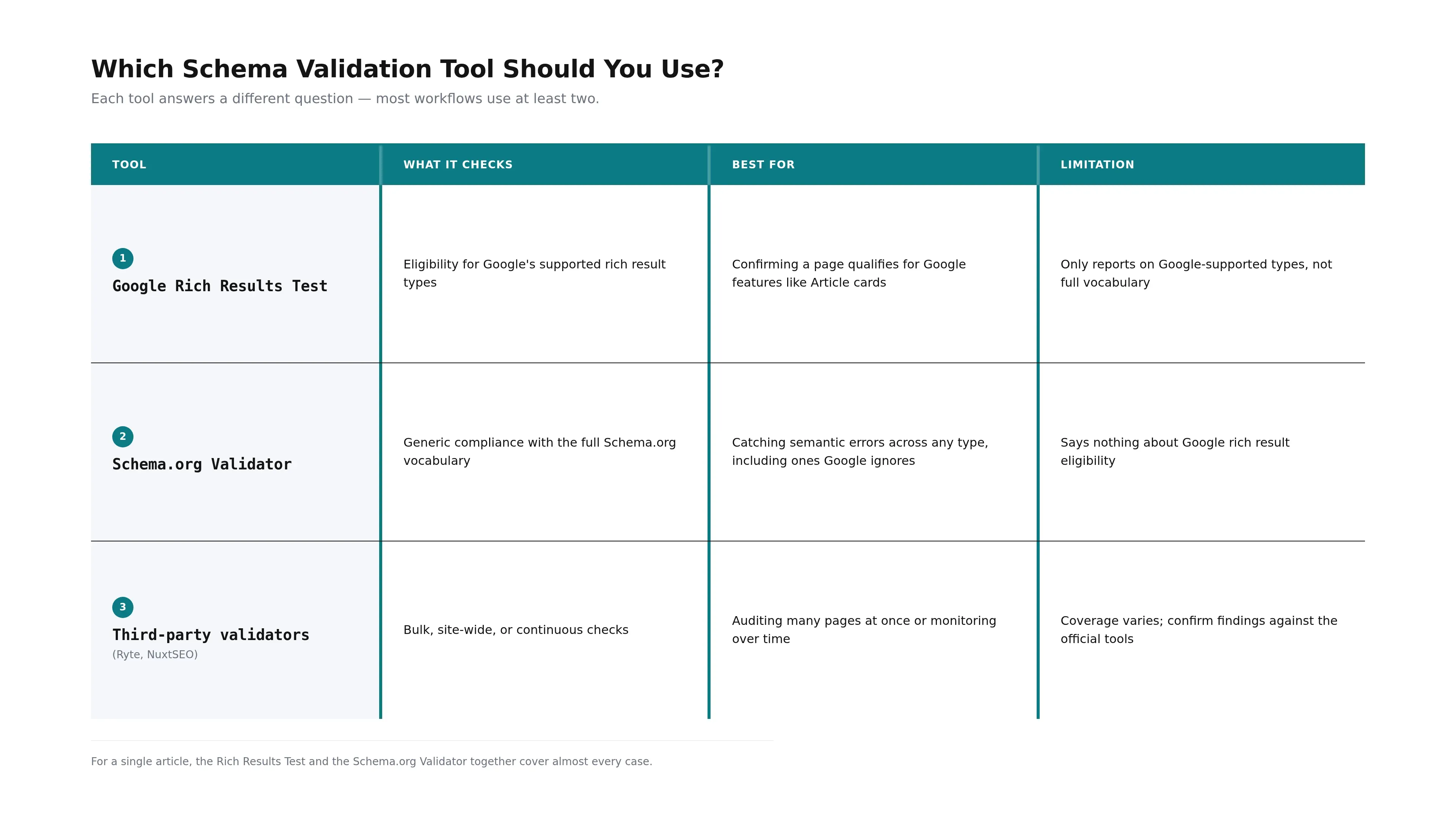
The two questions rarely overlap cleanly: a page can pass generic Schema.org compliance yet still not qualify for any Google feature, and it can be flagged as Google-ineligible while its underlying vocabulary is perfectly valid. That is why a single schema validator is rarely enough on its own.
| Tool | What it checks | Best for | Limitation |
|---|---|---|---|
| Google Rich Results Test | Eligibility for Google's supported rich result types | Confirming a page qualifies for Google features like Article cards | Only reports on Google-supported types, not full vocabulary |
| Schema.org Validator | Generic compliance with the full Schema.org vocabulary | Catching semantic errors across any type, including ones Google ignores | Says nothing about Google rich result eligibility |
| Third-party validators (Ryte, NuxtSEO) | Bulk, site-wide, or continuous checks | Auditing many pages at once or monitoring over time | Coverage varies; confirm findings against the official tools |
For a single article, the Rich Results Test and the Schema.org Validator together cover almost every case. A dedicated structured data testing tool or schema markup testing tool earns its place once you're auditing dozens of pages or watching for regressions after template changes, where checking each URL by hand stops being realistic.
How Do You Validate Your Schema Markup, Step by Step?
To validate your schema markup, paste the page URL or code into Google's Rich Results Test, review the detected items, then repeat with the Schema.org Validator for full-vocabulary coverage. Read every flagged item, separate errors from warnings, fix the errors, and re-test until the report comes back clean.
Valid markup with the required fields is necessary for rich result eligibility, and it must clear the Rich Results Test without errors-research on JSON-LD metadata links well-formed structured data to stronger recognition by both search and AI systems in a 2026 study of ChatGPT visibility. Here is the sequence that gets you there.
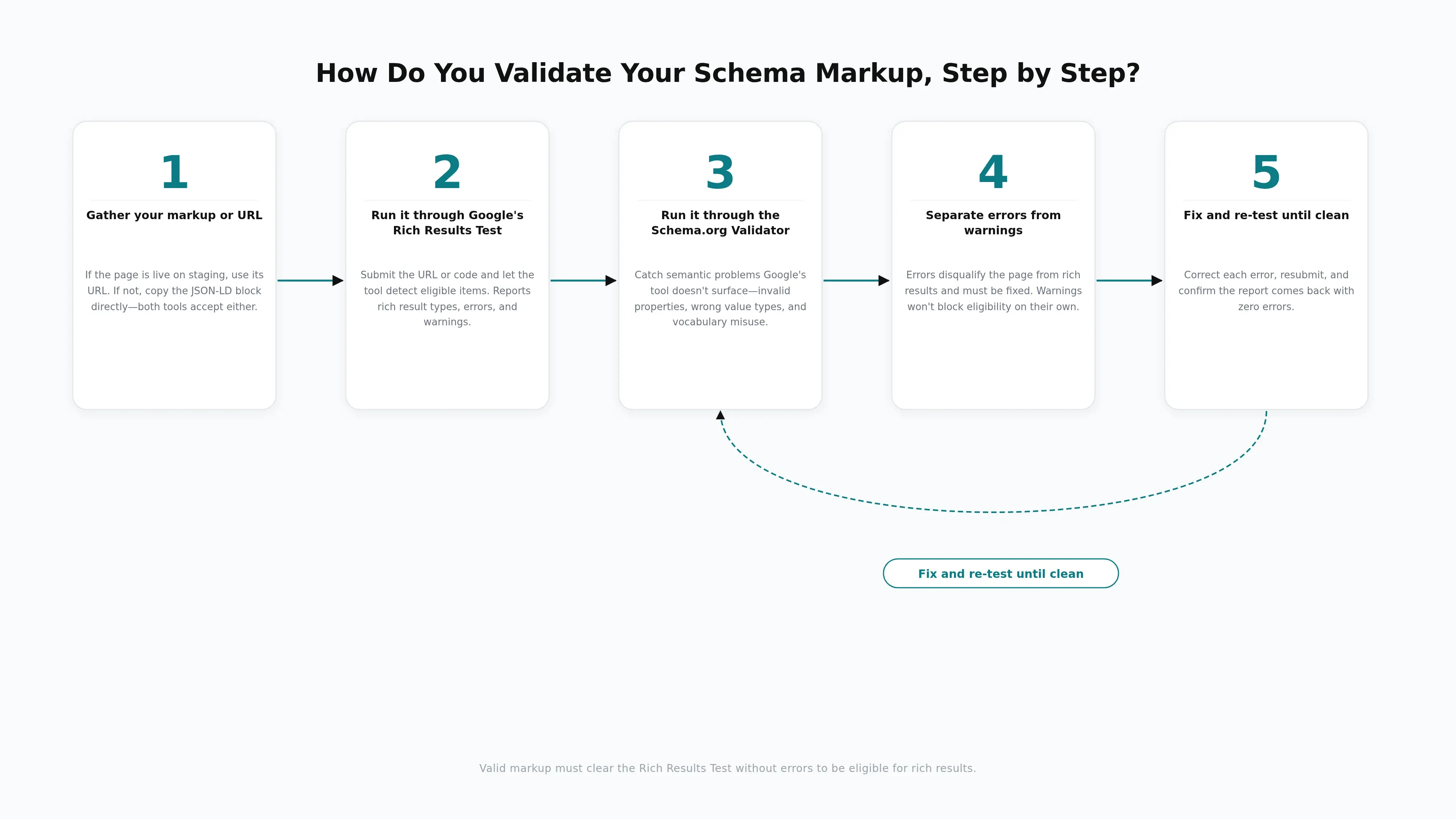
Gather your markup or URL.
If the page is already live on staging, use its URL so the tool tests the rendered output. If not, copy the JSON-LD block directly and use the code-snippet input instead-both tools accept either.
Run it through Google's Rich Results Test.
Submit the URL or code and let the tool detect eligible items. It reports which rich result types the page qualifies for and lists any errors or warnings against each detected type.
Run it through the Schema.org Validator.
Repeat with the generic validator to catch semantic problems Google's tool doesn't surface-invalid properties, wrong value types, and vocabulary misuse across every type on the page, not just Google-supported ones.
Separate errors from warnings.
Errors disqualify the page from rich results and must be fixed. Warnings flag recommended-but-optional fields-address them when you can, but they won't block eligibility on their own.
Fix and re-test until clean.
Correct each error, resubmit, and confirm the report comes back with zero errors. Only then is the page ready to publish.
Common Validation Errors and How to Fix Them
The most common validation errors fall into a few buckets: missing required fields, wrong data types, malformed JSON syntax, and mismatches between markup and the visible page content. Each has a clear fix, and most are caught in seconds once you know what the error text is pointing at.

Here are the ones you'll hit most often during pre-publish testing, and how to resolve each before the article goes live:
Missing required field. Article markup that lacks headline, image, or datePublished is disqualified from Article rich results. Add the missing property with a value that matches the visible content.
Invalid or mismatched value type. A field expecting a URL receiving a plain string, or a date field holding free text, triggers a semantic error. Correct the value to the type Schema.org specifies for that property.
Malformed JSON. A missing comma, unbalanced bracket, or unescaped character breaks the whole block. The validator points at the failing line-fix the character and re-test.
Markup that doesn't match visible content. Markup describing a rating, author, or date that isn't actually rendered on the page violates content guidelines. Align the markup with what the reader can see, or remove the claim.
FAQPage on an ineligible page. As of May 2026, FAQ rich results no longer display in Search for non-government and non-health sites. The markup still validates and still helps AI engines parse your question-and-answer pairs-our guide to FAQPage schema and AI answer engine citations covers why it's worth keeping for machine-readability even without the SERP feature.
SEO content that ranks, written and published for you
GetTraffic creates authority-building content clusters for your business. No writing, no freelancers, no content calendar. Agency-quality results at 91% less cost.
Start My Free TrialHow Do You Build Validation Into Your Publishing Workflow?
Build validation into your workflow as a mandatory gate between drafting and publishing-never after. Validate every article's markup before it reaches the live index, automate the check wherever you can, and treat a clean validation report as a non-negotiable publish condition, the same way you'd treat a passing test in code.
In practice that means three habits. First, validate at the point of publishing, not on a random schedule, so no article slips through unchecked. Second, re-validate whenever something upstream changes-a theme update, a plugin upgrade, or a template edit can silently break markup across every page that uses it. Third, automate the step so it doesn't depend on someone remembering to open two browser tabs. If manual testing is the bottleneck, automating schema generation and validation inside your CMS removes the handoff entirely-our guide to automating schema markup in your publishing workflow walks through that setup. Platforms like GetTraffic build the gate in directly, generating markup and validating it automatically before an article ever reaches the review queue.
That guardrail is the point of validation done right: clean markup makes strong content machine-readable and eligible for richer display, but it never rescues thin content. A validation gate protects the eligibility you've earned-it doesn't manufacture eligibility you haven't.
Validation is the cheap, five-minute step that separates schema that works from schema that quietly does nothing. Run every article through Google's Rich Results Test and the Schema.org Validator, fix every error before you publish, and re-check whenever a template or plugin changes underneath you. Done consistently, it turns structured data from a hopeful add-on into a reliable eligibility gate for rich results and AI citations. Done never, it leaves you guessing why the cards never showed up.
Frequently Asked Questions
Do validation warnings block rich results, or only errors?
Errors block rich result eligibility; warnings do not. The Rich Results Test flags warnings for recommended-but-optional fields-like a missing author image-that improve your result without being mandatory. Fix every error before publishing, since those disqualify the page entirely. Treat warnings as a prioritized to-do list: address them when you can, but they won't stop a valid page from earning rich results.
Which tool should I trust-the Rich Results Test or the Schema.org Validator?
Use both, because they answer different questions. Google's Rich Results Test tells you whether markup qualifies for Google's specific rich result features, while the Schema.org Validator checks compliance with the full Schema.org vocabulary regardless of Google support. A page can pass one and fail the other. Running both catches Google-eligibility gaps and generic semantic errors in a single validation pass.
How often should I re-validate schema after a page is published?
Re-validate whenever something upstream of the markup changes: a CMS or theme update, a schema plugin upgrade, a template edit, or a change to the visible content the markup describes. Template-level changes can silently break markup across every page that uses them, so a periodic spot-check of your key templates catches regressions before rankings or citations quietly slip away.
Is FAQPage schema still worth validating in 2026?
Yes. As of May 2026, FAQ rich results no longer display in Search for non-government and non-health sites, so the SERP payoff is gone-but valid FAQPage markup still improves machine-readability for AI answer engines like ChatGPT and Perplexity. Validating it ensures those engines can parse your question-and-answer pairs cleanly, which correlates with higher citation rates than pages without it.
Sources
Get your business on page 1 of Google
Get your business found on Google - SEO content written and published automatically.
Start My Free Trial7-day free trial
Related Reading

How to Add Schema Markup to Your Website: CMS Automation Guide

Schema Markup Generator Tools Compared: 8 Best Tools for Automating Structured Data in 2026

FAQPage Schema and AI Citations: How FAQ Markup Increases Your Chances of Being Cited by ChatGPT, Perplexity, and Google AI Overviews