
How to Add Schema Markup to Your Website: CMS Automation Guide


Table of Contents +
- Why Does Schema Markup Belong in Your Publishing Workflow?
- What Are the Four Ways to Add Schema Markup?
- How Do You Set Up Automated Schema Generation at Publishing Time?
- Which Schema Types and Fields Do Article Pages Need?
- How Should You Validate Schema Before Publishing?
- Integrating Schema Automation Into Your Content Operations
- Frequently Asked Questions About Adding Schema Markup
- References & Sources
Learn how to add schema markup automatically at publishing time-map article types, embed validated JSON-LD, and skip the developer ticket queue.
It's 4 p.m. on a Thursday. Twelve articles sit approved in your staging folder-formatted, internally linked, and ready to publish-except each one still needs structured data, and the last time you asked how to add schema markup to a batch this size, the answer was a developer ticket sitting three days deep in the queue.
So the batch waits. By the time the JSON-LD is hand-added, tested, and corrected, next week's articles are already stacking up behind it, and your publishing calendar has quietly slipped again. The bottleneck was never the drafting or the review-it was the manual markup step wedged between "approved" and "live," repeated for every single post.
The fix is to move that step upstream. This guide shows you how to generate, validate, and embed schema at publishing time, so structured data stops gating your content velocity and starts shipping automatically with every article.
Why Does Schema Markup Belong in Your Publishing Workflow?
Schema markup earns your articles eligibility for rich results and AI-engine citation by telling search systems what each page actually means. It belongs inside your publishing workflow because handling it by hand after every post turns a routine metadata task into a recurring bottleneck that caps how fast your whole content pipeline can move.
If you run content operations, you already feel this. A batch of approved articles waits while structured data implementation happens one page at a time. Schema communicates the semantic meaning of your content so search engines can display richer result cards with enhanced titles, images, and metadata, and it feeds the same signals AI answer engines lean on when they decide what to cite. Skip it and the page still publishes-it simply forfeits that eligibility.
Before you automate anything, it helps to be clear on what your markup must contain. Our complete guide to structured data for SEO covers the schema types, rich-result mechanics, and AI-citation fundamentals this workflow assumes, so treat it as the foundation this guide builds on.
The real cost isn't any single article-it's the compounding delay. When every post depends on someone adding JSON-LD after the fact, your publishing velocity is capped by the slowest handoff in the chain. Fix one article and the queue behind it barely moves. That's why the durable answer is structural: make schema a property of publishing, not a chore you remember to do afterward.
GetTraffic writes and publishes SEO content automatically - articles that build authority and drive organic traffic - start your free trial.
What Are the Four Ways to Add Schema Markup?
You can add schema markup four ways: hand-coded JSON-LD, CMS plugins like Yoast SEO and Rank Math, API-driven generation, and full CMS automation that embeds markup at publishing time. They differ mainly in developer time, ongoing maintenance, and how well each one scales across a growing content library.
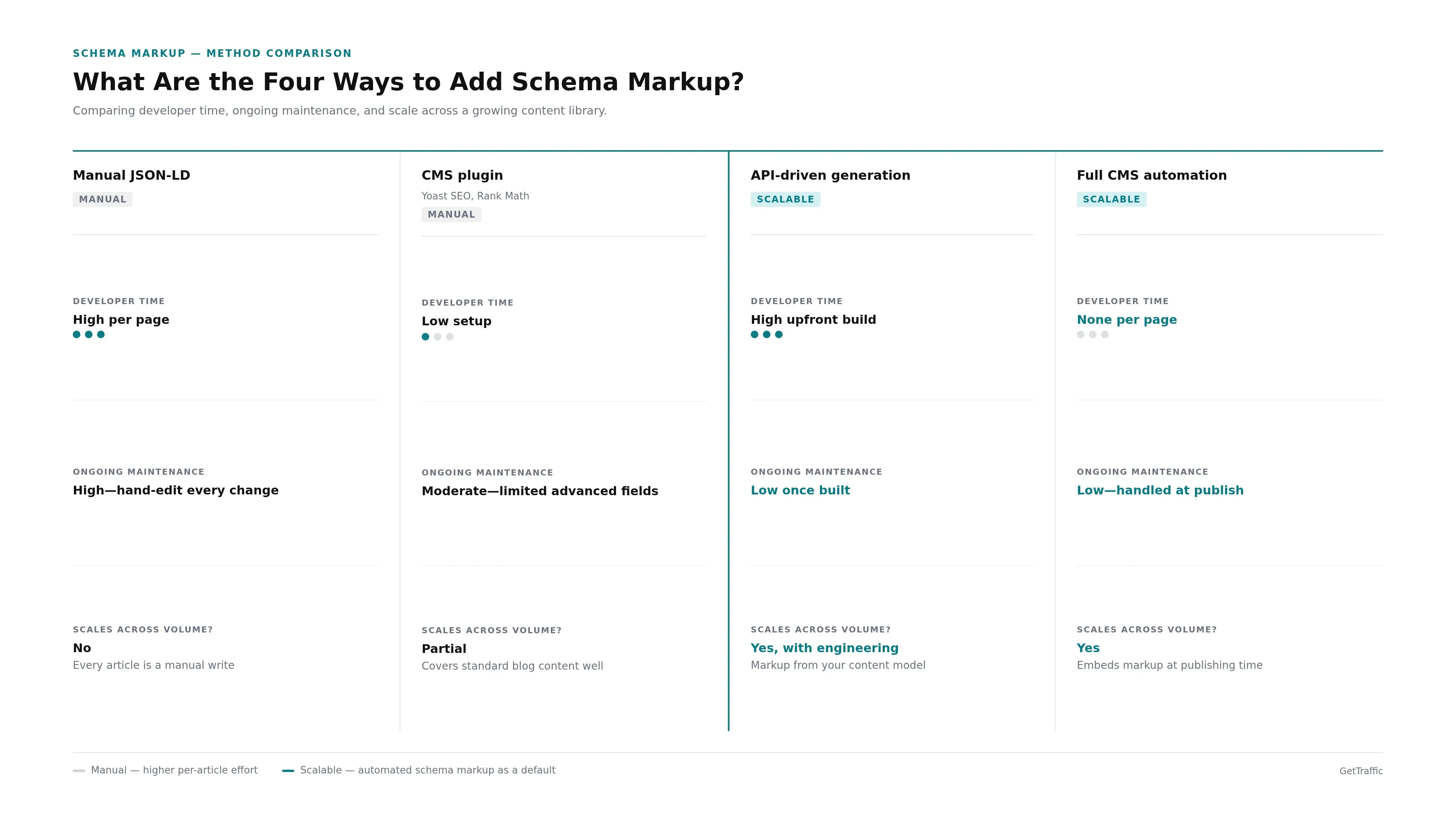
| Method | Developer time | Ongoing maintenance | Scales across volume? |
|---|---|---|---|
| Manual JSON-LD | High per page | High-hand-edit every change | No |
| CMS plugin (Yoast, Rank Math) | Low setup | Moderate-limited advanced fields | Partial |
| API-driven generation | High upfront build | Low once built | Yes, with engineering |
| Full CMS automation | None per page | Low-handled at publish | Yes |
Hand-coded JSON-LD gives you complete control and complete overhead: every article, and every later edit, is a manual write. CMS plugins remove most of that friction by generating baseline Article, Organization, and BreadcrumbList markup from your post metadata, which covers standard blog content well.
Plugins do trade away control over advanced fields such as knowsAbout and areaServed. If you're weighing that trade-off on WordPress specifically, our comparison of Yoast SEO, Rank Math, and custom JSON-LD breaks down where each option stops. API-driven generation and full CMS automation sit at the scalable end: the first builds markup programmatically from your content model, and the second embeds validated JSON-LD at publish with no per-article work. The right choice depends on your volume-but only the last two methods make automated schema markup a default rather than a task you keep reassigning.
How Do You Set Up Automated Schema Generation at Publishing Time?
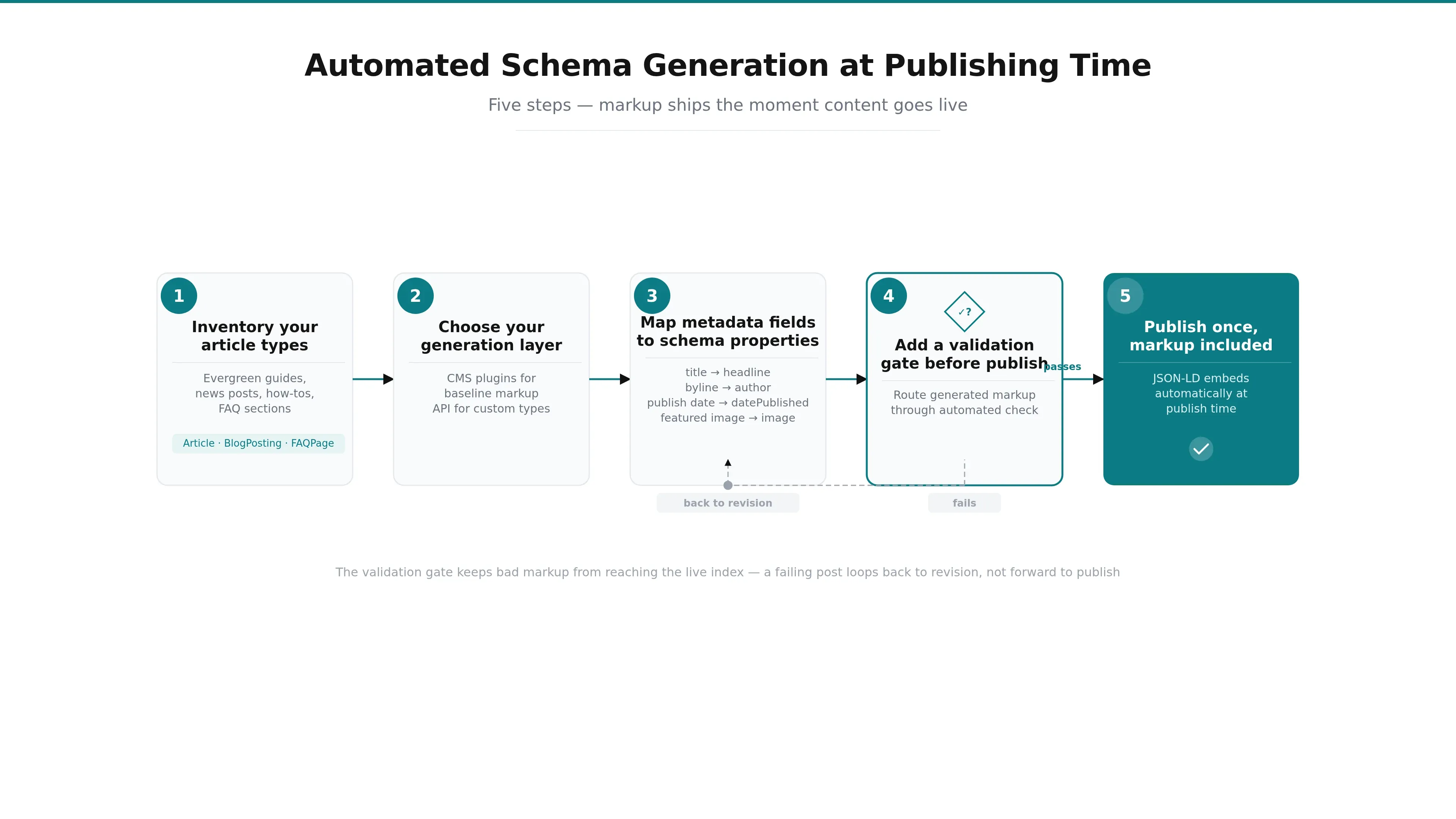
Set up automated schema generation by mapping each article type to its schema type, configuring a generation layer that reads your post metadata, and wiring a validation gate ahead of publish. Done right, markup is embedded the moment content goes live-no separate developer ticket, no post-publish remediation cycle wedged into your calendar.
What you'll need
- A CMS or content platform that supports JSON-LD injection at publish
- An inventory of the article formats you actually publish
- Access to Google's Rich Results Test and the Schema.org Validator
- Your standard post metadata: author, publication date, featured image, headline
Inventory your article types.
List the content formats you publish-evergreen guides, news posts, how-tos, pages with FAQ sections-and note which schema type each one should carry (Article, BlogPosting, NewsArticle, FAQPage). This mapping is the ruleset every later step follows, so it's worth doing before you touch any tooling.
Choose your generation layer.
CMS plugins automate baseline markup from article metadata during content creation, while API and native platform generation cover custom types and advanced fields. If you're shopping the middle tier, our roundup of schema markup generator tools compares eight options against exactly this kind of workflow.
Map metadata fields to schema properties.
Wire your existing fields-title to headline, byline to author, publish date to datePublished, featured image to image-so markup populates itself from data you already enter. This is what removes the per-article writing step entirely.
Add a validation gate before publish.
Route generated markup through an automated check so nothing invalid can ship. A gate that fails a post back to revision, rather than to the live index, is what keeps a bad field from quietly disqualifying a page from rich results.
Publish once, markup included.
With the mapping and gate in place, publishing embeds the JSON-LD automatically. Platforms built for this, like GetTraffic, detect the schema type during drafting, embed validated Article, FAQ, and Breadcrumb markup, and publish in one click to Shopify, WordPress, Webflow, and other connected systems-so there's no standalone markup step left at all.
Which Schema Types and Fields Do Article Pages Need?
Article content needs four core schema types: Article (or its BlogPosting and NewsArticle subtypes) for the main post, FAQPage for pages with genuine question-and-answer sections, BreadcrumbList for site structure, and Organization to establish publisher context. Each carries a small set of fields that search engines read to build richer, more descriptive result cards.
| Schema type | Use it for | Key fields |
|---|---|---|
| Article / BlogPosting / NewsArticle | The main body of a post | headline, description, image, datePublished, dateModified, author, articleBody |
| Organization | Publisher context | name, url, logo, sameAs |
| BreadcrumbList | Site structure | itemListElement, position, name, item |
| FAQPage | Pages with real Q&A sections | mainEntity, name, acceptedAnswer |
Article schema is the primary type for a post, and its core fields-headline, description, image, publication and modification dates, author, and body-stay consistent whether you're shipping a how-to, a news item, or an evergreen guide. Article schema in particular supplies publication date, author, and headline, which improves click-through and rich-result eligibility.
Use JSON-LD as your embedding format. It's Google's recommended approach because it separates the markup from your visible HTML, nesting inside a single script tag instead of scattering attributes through your content. For template-driven publishing at scale, that separation is the whole point: you can update markup without ever risking your page layout, which is exactly what makes it safe to automate.
How Should You Validate Schema Before Publishing?
Validate schema before publishing because malformed markup is silently ignored by crawlers-the page simply loses its rich-result eligibility and AI-citation probability with no error shown to you. Automated validation gates inside your CMS catch syntax and structure problems before content reaches the index, replacing slow manual round-trips through external testing tools.
Markup has to be both syntactically correct and semantically sound, meaning properties and values genuinely match schema.org definitions. Structured data is a critical visibility signal across traditional and generative search only when engines can actually parse it, so validation isn't a nice-to-have-it's the difference between markup that works and markup that's invisible.
Google's Rich Results Test and the Schema.org Markup Validator let you verify markup manually, and they're worth knowing. But testing every article by hand reintroduces the exact bottleneck you're trying to remove. The scalable move is to fold validation into the publishing flow itself: an automated gate that blocks invalid markup from shipping eliminates post-publish rework entirely. GetTraffic runs schema syntax and structure verification as one of its six automated review gates, so invalid markup never reaches your approval queue in the first place. For the full pre-publish checklist and how to read validator output, see our walkthrough on how to validate schema markup before publishing.
SEO content that ranks, written and published for you
GetTraffic creates authority-building content clusters for your business. No writing, no freelancers, no content calendar. Agency-quality results at 91% less cost.
Start My Free TrialIntegrating Schema Automation Into Your Content Operations
Move schema automation from setup to standing practice by planning the rollout around your existing article types, then tracking the metrics that prove it worked: time saved per article, fewer developer tickets, and faster batch publishing. Treat ongoing markup upkeep as a monitoring task rather than a manual re-edit you schedule and forget.
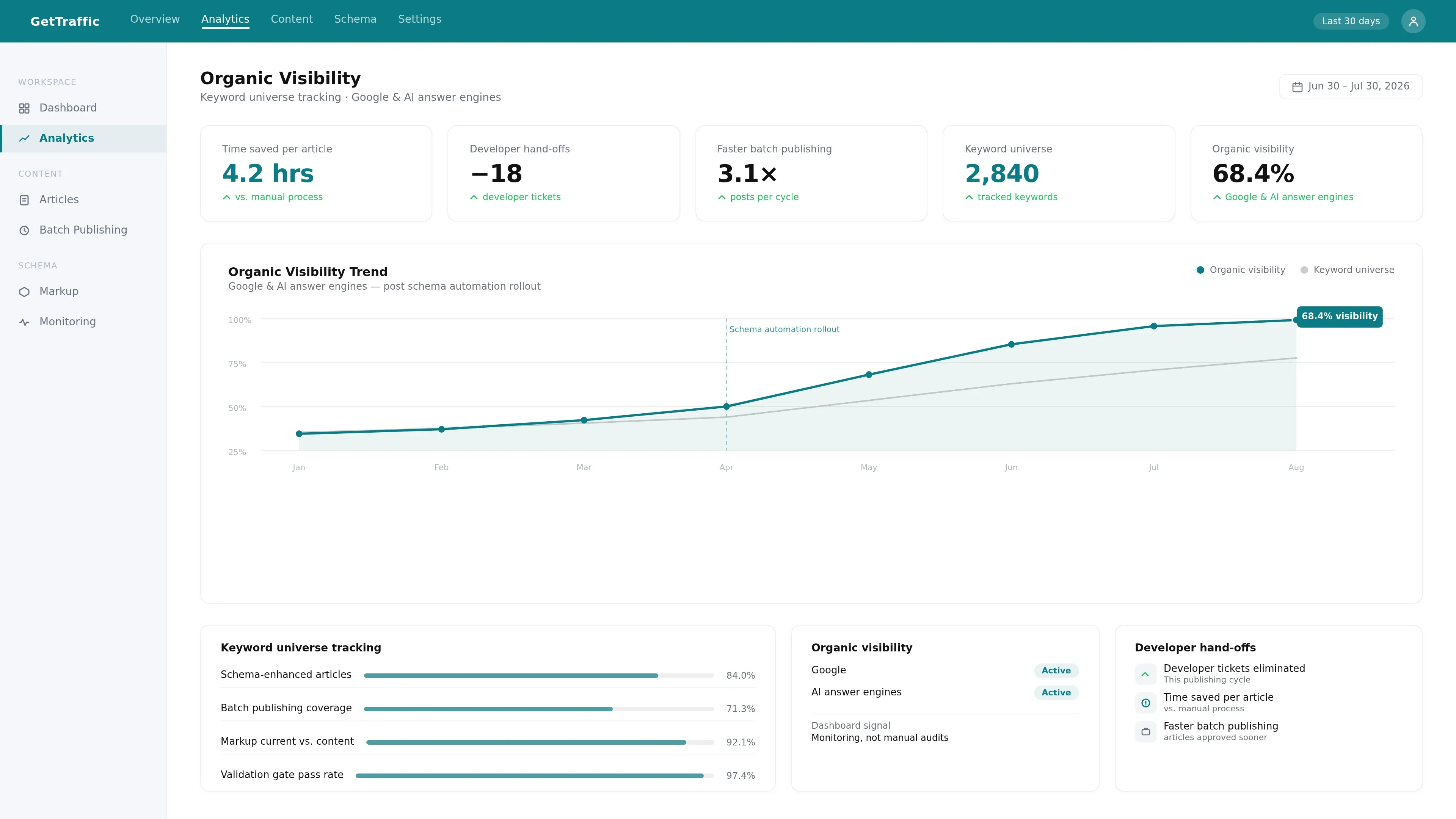
Start with the article types you publish most, since those return the largest share of saved time fastest. Wire their schema mapping and validation gate first, ship a batch, and measure the delta against your old manual process. The numbers that matter are concrete: how many developer hand-offs disappeared, how much sooner an approved article went live, and how many posts you now publish in a cycle. GetTraffic surfaces these same signals-keyword universe tracking and organic visibility across Google and AI answer engines-in a single analytics dashboard, so the payoff stays visible instead of buried in spreadsheets.
Keeping markup current as content evolves
Schema isn't set-and-forget. As you update articles, dates and fields drift, and a page's markup can quietly fall out of step with its content. The maintainable answer is monitoring, not manual audits-GetTraffic flags articles whose content or markup has aged relative to current search conditions before rankings decline, so upkeep becomes a dashboard signal instead of a recurring chore. Once generation, validation, and monitoring all live inside one workflow, structured data implementation stops being a project you revisit and becomes a default your publishing pipeline maintains on its own.
Adding schema markup doesn't have to mean a standing dependency on your developers. Once generation, validation, and embedding all happen inside your publishing flow, every approved article ships with valid JSON-LD the moment it goes live-and your team's velocity stops bending around a manual step buried between approval and publish.
Start by mapping your article types, pick the generation layer that matches your scale, and put a validation gate in front of publish. From there, schema becomes a property of publishing rather than a task you have to remember. That's the shift that turns markup from a bottleneck into a background process.
Frequently Asked Questions About Adding Schema Markup
Do I need to know how to code to add schema markup?
No. Hand-coding JSON-LD is only one of four approaches. CMS plugins like Yoast SEO and Rank Math generate baseline Article, Organization, and BreadcrumbList markup from your post metadata automatically, and platforms with native schema generation embed validated markup at publish with no code at all. Coding gives you the most control over advanced fields, but it isn't required for standard article content.
Is JSON-LD better than Microdata or RDFa?
For most publishers, yes. JSON-LD is Google's explicitly recommended format because it separates structured data from your visible HTML, nesting inside a single script tag. Microdata and RDFa embed markup directly into HTML attributes, which risks disturbing your layout when content changes. For template-driven CMS workflows, JSON-LD is both safer and faster to deploy and update at scale.
Which schema type should a blog post use?
Use Article or its BlogPosting subtype as the primary type for a standard blog post, and NewsArticle for time-sensitive news content. Pair it with Organization to establish publisher context and BreadcrumbList to communicate site structure. If the post contains a genuine question-and-answer section, add FAQPage markup. The core Article fields-headline, description, image, publication date, and author-apply across all these formats.
Why doesn't my valid schema produce rich results?
Valid markup makes a page eligible for rich results, but eligibility isn't the same as guaranteed display. The first thing to check is whether the markup actually passes validation-malformed JSON-LD is silently ignored by crawlers, so a single bad field can disqualify a page with no error shown. Confirm the schema parses cleanly, then make sure it accurately describes content that earns visibility on its own merits.
References & Sources
Get your business on page 1 of Google
Get your business found on Google - SEO content written and published automatically.
Start My Free Trial7-day free trial