
WordPress Schema Plugin: Comparing Yoast SEO, Rank Math, and Custom JSON-LD


Table of Contents +
- Why Does WordPress Schema Markup Matter for Search and AI Citations?
- Yoast SEO: Plugin-Based Schema Generation
- Rank Math: Advanced Schema Automation for WordPress
- Custom JSON-LD: Full Control Without a Plugin
- Yoast vs Rank Math vs Custom: How Do They Compare?
- Which WordPress Schema Solution Fits Your Workflow?
- How Do You Validate and Maintain Schema Markup?
- FAQs: WordPress Schema Plugin Options
- Sources and References
Compare WordPress schema plugin options - Yoast SEO, Rank Math, and custom JSON-LD - and match structured data to your publishing volume.
If you run a WordPress site and want your articles eligible for rich results and citation in AI answer engines, you have three realistic ways to generate structured data: the Yoast SEO plugin, the Rank Math plugin, or custom JSON-LD written into your theme templates. Choosing a WordPress schema plugin - or deciding to skip plugins entirely - is one of the first decisions that shapes how your structured data gets produced.
All three chase the same goal: valid, machine-readable markup that tells Google and AI engines what your content is. But they get there in very different ways, with different ceilings on field control, validation, and how many articles you can process before the workflow strains.
Pick wrong and the cost compounds. Choose a plugin that caps the fields you need and you're hand-editing markup on every post; choose custom JSON-LD before you have the developer capacity and your publishing calendar stalls waiting on template changes. The right answer isn't the most powerful option - it's the one that matches how much you publish.
Why Does WordPress Schema Markup Matter for Search and AI Citations?
Schema markup matters because it translates your content's meaning into a structured format search engines and AI systems can read directly. Valid markup makes pages eligible for rich results and raises the odds of citation in AI answers - without it, crawlers can't reliably interpret your content, and rich formatting is off the table entirely.
Structured data communicates the semantic meaning of a page, which lets Google build richer result cards - enhanced titles, images, and metadata that can lift click-through rates on your listings. Research on schema in e-commerce found that JSON-LD markup helps search engines identify page content more accurately and improves visibility in the results pages. Article schema specifically surfaces the publication date, author, and headline that make a result stand out.
There's a hard gate worth understanding before you invest: rich result formatting requires valid, correctly structured markup that matches the content type. Missing or malformed markup automatically disqualifies a page from rich display - the formatting simply never appears. That eligibility gate is exactly what a schema tool exists to clear on every post you publish.
If you're new to how structured data drives visibility, our complete guide to schema markup, rich results, and AI citations covers the foundations this comparison builds on.
GetTraffic writes and publishes SEO content automatically - articles that build authority and drive organic traffic - start your free trial.
Yoast SEO: Plugin-Based Schema Generation
Yoast SEO generates schema automatically from the metadata you already enter - title, author, publication date, and featured image - and outputs it as JSON-LD with no code. It covers the core types most publishers need: Article, Organization, Breadcrumb List, and FAQ Page, assembled into a connected graph for each post.

The appeal is speed. Because plugins like Yoast generate baseline Article, Organization, and Breadcrumb List markup directly from article metadata, you never hand-write a line of JSON-LD. You fill in the fields the WordPress editor already asks for, and the plugin builds the structured data during content creation. For a marketing manager or shop owner without a developer on call, that removes the single biggest barrier to shipping schema at all.
The tradeoff is where plugin automation shows its ceiling. Yoast schema markup is strong on the common types but limits advanced fields - properties like knowsAbout or areaServed aren't exposed in the standard interface. If your content needs those fields, or schema types beyond the core set, you're pushed toward Yoast's developer filters. For most small editorial teams that's a non-issue; for anyone with complex entity requirements, it's the first wall you hit.
Rank Math: Advanced Schema Automation for WordPress
Rank Math takes plugin-based schema further with a dedicated schema builder and a wider catalog of supported types than Yoast offers out of the box. It automates the same core Article and Organization markup from your metadata, then lets you attach, edit, and preview additional schema types per post through a visual interface rather than code.
Where Yoast keeps schema mostly automatic and behind the scenes, Rank Math schema is built around configurability. The schema builder exposes more types and more fields, and it lets you set a default schema per post type - so every post or product inherits the right template without per-post setup. That default-template behavior is the practical difference for a content team: you configure once and the markup follows your publishing pattern.
The upside over a purely automatic plugin is control without leaving WordPress. You can layer FAQ Page markup onto an article that has a genuine question-and-answer section, adjust fields in the visual editor, and preview the output before publishing. The tradeoff is familiar, though: a plugin builder still operates within the fields its developers chose to expose. For standard blog and e-commerce use it rarely bites, but multi-entity organizations and dynamic field hierarchies eventually reach the same ceiling every plugin shares.
Custom JSON-LD: Full Control Without a Plugin
Custom JSON-LD means writing structured data directly into your theme templates or injecting it through code, bypassing plugins entirely. It gives you full control over every field and schema type, and it scales cleanly across large content operations. The cost is that you own validation, version control, and deployment yourself rather than letting a plugin handle them.
The reason all three approaches emit JSON-LD comes down to format safety. JSON-LD is Google's recommended format because it separates structured data from your visible HTML - the markup nests in a script tag instead of threading through page attributes, so updating content can't corrupt your layout. Microdata and RDFa embed markup inside the HTML itself, which makes them riskier to maintain at scale. Our deeper look at why JSON-LD is the recommended format unpacks that tradeoff in full.
Custom implementation earns its keep when you need what plugins can't give: schema stacking with multiple types per page through @graph arrays, dynamic areaServed hierarchies, multi-site entity relationships, and fields like knowsAbout that plugins hide. Because the markup lives in templates, it deploys through the same version-control and review workflow as the rest of your code.
The operational catch is real, though. There's no interface catching your mistakes - you validate the output yourself, keep schema logic under version control, and fold it into a deployment process. Get that infrastructure right and custom JSON-LD is the most scalable path; skip it and you've traded a plugin's guardrails for silent, unvalidated markup.
Yoast vs Rank Math vs Custom: How Do They Compare?
Across the dimensions that matter - supported schema types, field customization, validation, integration, deployment simplicity, and scalability - the three approaches trade ease for control. Yoast is simplest and most automatic, Rank Math adds configurability through its builder, and custom JSON-LD gives complete control at the cost of the infrastructure you have to build and maintain yourself.
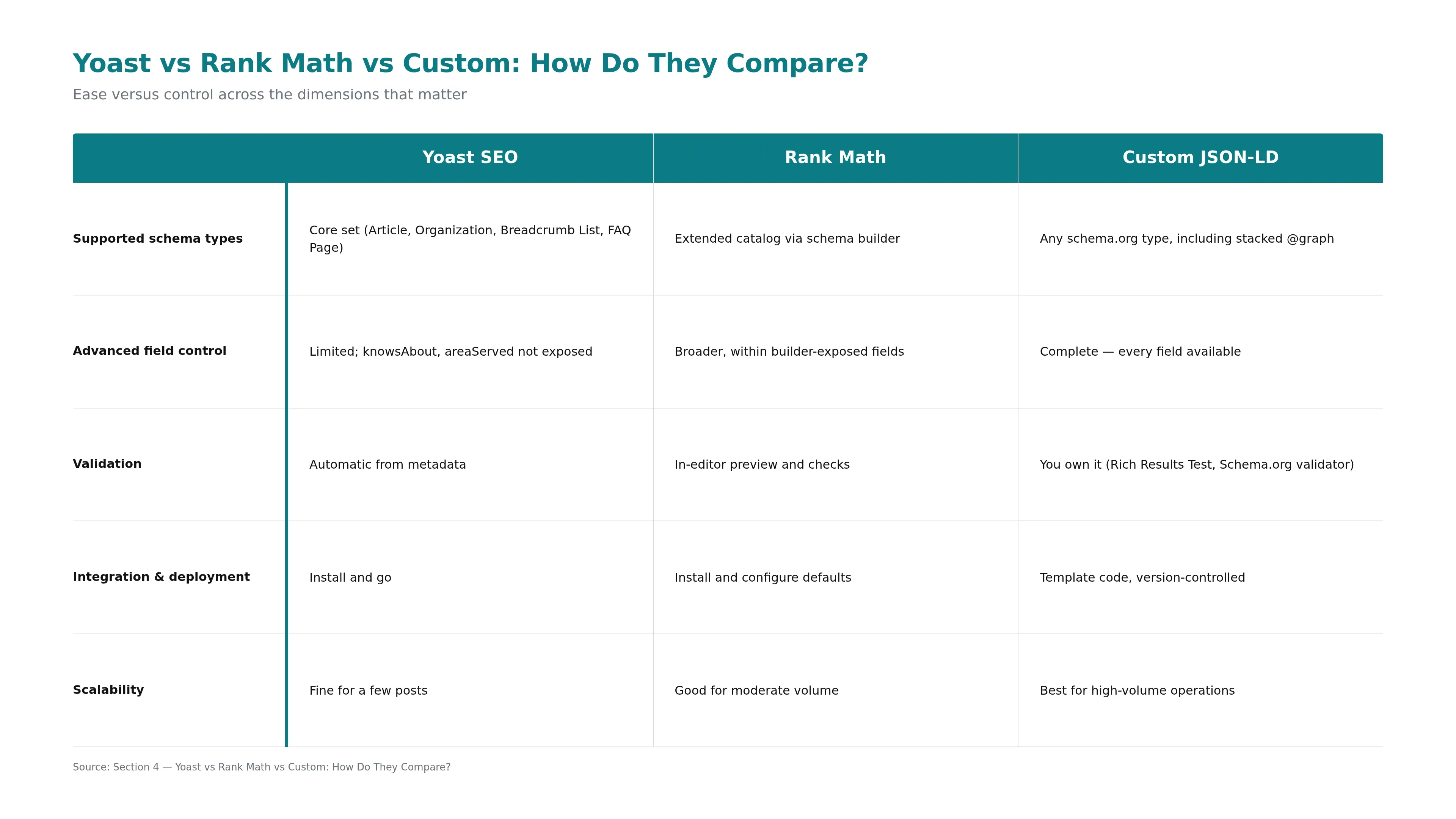
| Dimension | Yoast SEO | Rank Math | Custom JSON-LD |
|---|---|---|---|
| Supported schema types | Core set (Article, Organization, Breadcrumb List, FAQ Page) | Extended catalog via schema builder | Any schema.org type, including stacked @graph |
| Advanced field control | Limited; knowsAbout, areaServed not exposed | Broader, within builder-exposed fields | Complete - every field available |
| Validation | Automatic from metadata | In-editor preview and checks | You own it (Rich Results Test, Schema.org validator) |
| Integration & deployment | Install and go | Install and configure defaults | Template code, version-controlled |
| Scalability to dozens per month | Fine for a few posts | Good for moderate volume | Best for high-volume operations |
The customization row is where the choice gets concrete. Whatever tool you pick has to generate Article schema's core fields correctly - headline, description, image, publication and modified dates, author as a Person with name and affiliation, and the article body. Plugins handle those defaults reliably; the gap opens on the advanced and stacked fields that complex entities need.
Worth noting: fewer, well-chosen fields tend to outperform exhaustive markup. Focused implementations that cover the fields your content actually uses beat sprawling markup with dozens of fields, because content quality and visible structure carry more weight than schema comprehensiveness. That argues against chasing the tool with the longest feature list for its own sake.
If you're weighing standalone options alongside plugins, our roundup of schema markup generator tools compares the wider field.
SEO content that ranks, written and published for you
GetTraffic creates authority-building content clusters for your business. No writing, no freelancers, no content calendar. Agency-quality results at 91% less cost.
Start My Free TrialWhich WordPress Schema Solution Fits Your Workflow?
The right choice tracks your publishing volume. If you ship one to five articles a month, a plugin - Yoast for simplicity, Rank Math for more control - covers you without a developer. If you publish ten or more articles monthly across many types, custom JSON-LD or a platform that automates it becomes the path that actually scales.
For a small editorial team, the decision criteria are short: which schema types do you need, do you require fields beyond the core set, and can you validate in-editor? If the answer is core types and low volume, Yoast wins on speed and Rank Math wins if you want a builder and defaults per post type. Either plugin is the sensible starting point, and neither locks you out of upgrading later.
The calculus flips for content operations. Once you're generating dozens of articles a month, per-post plugin configuration becomes the bottleneck, and manual markup or plugin ceilings turn into a recurring tax. This is where teams either build custom JSON-LD infrastructure or adopt a platform that folds schema generation into publishing. GetTraffic takes the custom-JSON-LD route as managed automation - it generates and embeds validated schema for every article in a topical cluster, so a ten-article-a-month cadence doesn't depend on a developer per post.
Whichever way you lean, the underlying move is the same: automate markup generation inside your publishing flow rather than bolting it on afterward. Our guide to adding schema markup through CMS automation walks through what that looks like in practice.
How Do You Validate and Maintain Schema Markup?
Validate every markup before publishing and monitor it after. Schema must be syntactically correct and semantically sound, because crawlers silently ignore invalid markup - a broken property doesn't throw an error, it just quietly disqualifies the page from rich results. Google's Rich Results Test and the Schema.org validator are the two tools that catch problems first.
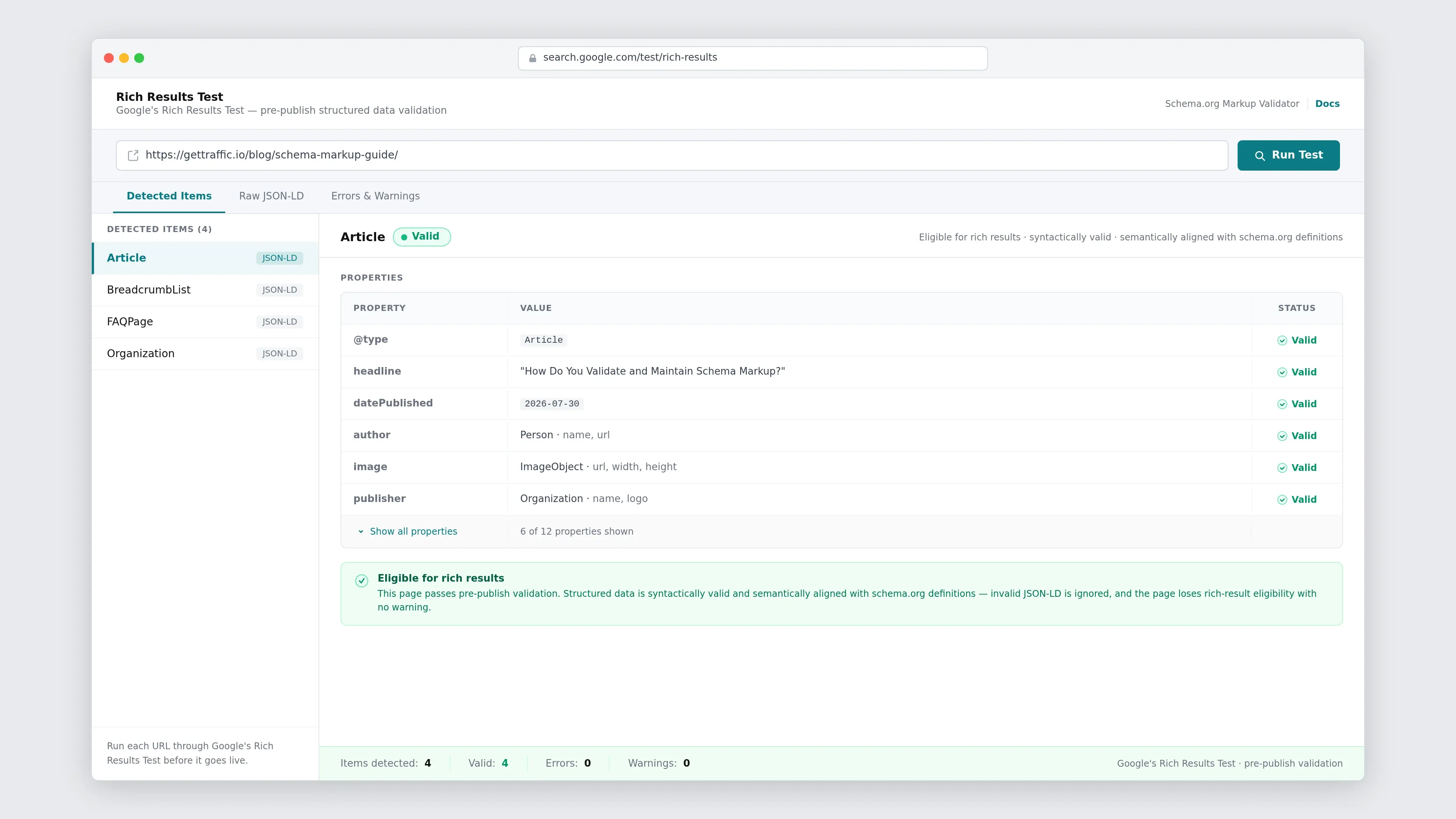
Pre-publish validation is the step that separates markup that works from markup that's silently dead. Structured data has to be both syntactically valid and semantically aligned with schema.org definitions to be recognized - invalid JSON-LD is ignored, and the page loses rich-result eligibility and AI-citation probability with no warning. Run each URL through Google's Rich Results Test and the Schema.org Markup Validator before it goes live.
How you do this depends on your approach. With Yoast and Rank Math, the plugin validates as it generates, so most syntax problems never reach publish. With custom JSON-LD, validation is a manual gate you build into deployment - test, then ship. Either way, don't stop at launch: markup can drift as content changes, so periodic re-checks of live pages catch schema that's fallen out of sync.
The highest-leverage improvement is moving validation before publish rather than after. Automated pre-publish checks inside your workflow prevent invalid markup from ever going live, which eliminates the post-publish rework cycle of discovering broken schema in the index and fixing it retroactively.
There's no universal best WordPress schema plugin - only the right fit for how much you publish. Yoast SEO gets core schema live with zero code, Rank Math adds a builder and per-type defaults for teams that want more control, and custom JSON-LD hands you complete field access and clean scalability in exchange for owning validation and deployment. Start from your volume and schema requirements, not from a feature checklist.
Whatever you choose, the constant is the same: generate valid markup automatically inside your publishing flow, validate before you ship, and keep an eye on live pages as content changes.
FAQs: WordPress Schema Plugin Options
Do I need a schema plugin if my WordPress theme already adds some markup?
Not necessarily, but you should verify what's actually there. Many themes emit partial or generic markup that misses required Article fields or conflicts with a plugin's output, producing duplicate or invalid schema. Run your pages through Google's Rich Results Test to see what's present, then either configure your theme's markup properly or use a dedicated plugin so the fields search engines expect are complete and valid.
Is Yoast or Rank Math the better schema plugin for WordPress?
Neither is universally better - it depends on how much control you want. Yoast schema markup is more automatic and hands-off, ideal if you publish a few posts a month and want core types handled without configuration. Rank Math schema offers a builder with more types and per-post-type defaults, better if you need to attach and edit specific schema regularly. Both cover the core Article and Organization types reliably.
When should I switch from a plugin to custom JSON-LD?
Switch when plugin limitations start costing you time or coverage. The usual triggers are publishing volume above roughly ten articles a month, needing schema types or fields plugins don't expose - like stacked @graph markup or dynamic areaServed hierarchies - or requiring schema logic under version control. Below that threshold, a plugin's speed usually wins. Above it, custom implementation or a platform that automates JSON-LD generation scales far better.
How do I validate schema markup before publishing?
Run your page through Google's Rich Results Test and the Schema.org Markup Validator before it goes live. The first shows which rich-result types your markup qualifies for; the second flags syntax and semantic errors against schema.org definitions. Because crawlers silently ignore invalid markup, this pre-publish check is essential - a malformed property caught in a draft is trivial to fix, but one discovered after indexing requires a re-crawl.
Sources and References
Get your business on page 1 of Google
Get your business found on Google - SEO content written and published automatically.
Start My Free Trial7-day free trial