
BreadcrumbList Schema: Step-by-Step JSON-LD Implementation Guide


Table of Contents +
- What Is BreadcrumbList Schema and Why Does It Matter?
- How Is BreadcrumbList JSON-LD Structured?
- How Do You Add BreadcrumbList Markup to Your Site?
- Common Mistakes and Best Practices
- How Do You Validate BreadcrumbList Markup Before Publishing?
- Automating BreadcrumbList Generation in Your Workflow
- Frequently Asked Questions About BreadcrumbList Schema
- Sources and Further Reading
Add BreadcrumbList schema with JSON-LD: build ListItems, embed the markup, validate before publishing, and automate it across every page.
A breadcrumb trail looks like a small convenience - that thin line of links near the top of a page reading Home › Guides › Schema. What does the actual work for search engines, though, isn't the visible trail. It's breadcrumblist schema: a block of JSON-LD that encodes the ordered path from your site root to the current page as machine-readable list items, each stamped with a position number and a URL.
That ordering property is the whole point. Without it, a crawler sees a page as an isolated URL with no sense of where it lives in your site. With it, the engine can reconstruct your hierarchy and render it directly in the search result - the exact context that earns a click over a bare blue link. The cost of skipping it compounds at scale: a single article is a five-minute fix, but a cluster of ten interlinked pages published every month turns manual breadcrumb markup into a recurring developer handoff that quietly stalls the pipeline. This guide walks through the structure, the implementation, the mistakes to avoid, and how to stop doing it by hand.
What Is BreadcrumbList Schema and Why Does It Matter?
BreadcrumbList schema is a core structured-data type that tells search engines where a page sits in your site hierarchy. It maps the trail from homepage to current page as an ordered list, letting Google display that path in the result and helping both crawlers and AI answer engines understand how your content is organized.
Breadcrumb markup rarely travels alone. It's one of the core schema types for article publishers, typically deployed alongside Article or BlogPosting schema to establish a page's structure and hierarchy. If you're newer to structured data as a whole, our complete guide to schema markup and rich results covers the foundations this article builds on.
Its practical value shows up in the search result itself. Breadcrumb schema helps Google understand your site hierarchy and can improve click-through rates by enabling richer SERP display that shows the page's position in your site structure rather than a raw URL. For publishers chasing competitive keywords, that extra line of context is a small but real edge - the difference between a result that reads Home › Running Shoes › Trail and one that reads example.com/cat/2291.
The benefit extends past traditional search, too. Breadcrumb structured data also signals content organization to AI answer engines, contributing to the hierarchy cues that large language models use when deciding what to cite. It won't rank a page by itself, but it makes an already-good page easier to place and easier to surface.
GetTraffic writes and publishes SEO content automatically - articles that build authority and drive organic traffic - start your free trial.
How Is BreadcrumbList JSON-LD Structured?
A BreadcrumbList in JSON-LD is a container object with an itemListElement array. Each entry is a ListItem carrying three required properties: position (its order in the trail), name (the human-readable label), and item (the page URL). Engines read the positions in sequence to rebuild the path from root to current page.
The container is a BreadcrumbList object that holds an itemListElement array. Inside, each ListItem needs those three properties: position is an integer marking order, name is the visible label, and item is the URL of that step. Here's a valid three-level product trail written as breadcrumb structured data in JSON-LD:
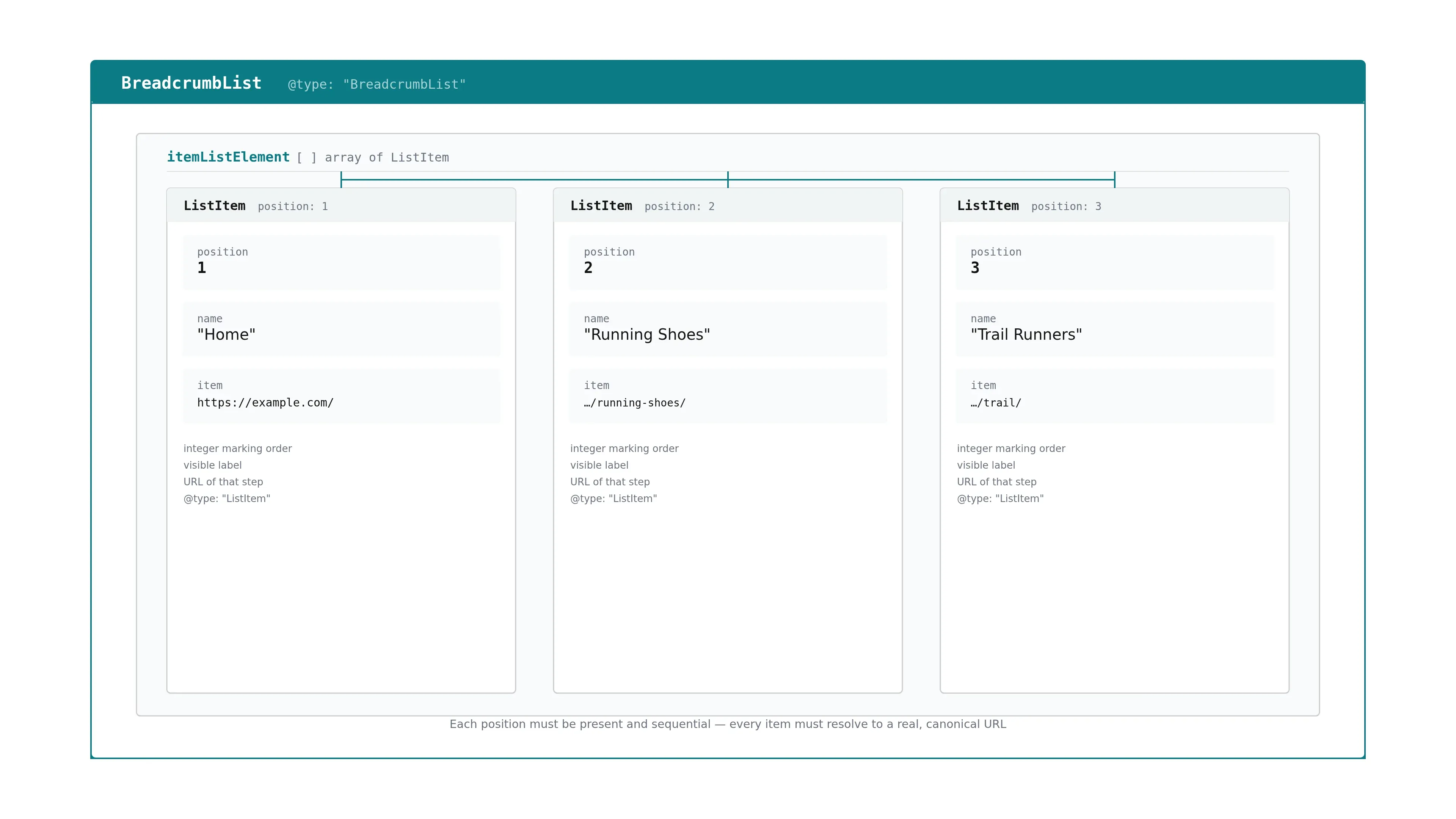
@context: "https://schema.org", @type: "BreadcrumbList", itemListElement: [ {@type: "ListItem", position: 1, name: "Home", item: "https://example.com/"}, {@type: "ListItem", position: 2, name: "Running Shoes", item: "https://example.com/running-shoes/"}, {@type: "ListItem", position: 3, name: "Trail Runners", item: "https://example.com/running-shoes/trail/"} ]
An invalid version usually fails in one of two ways: positions that don't start at 1 or skip a number, or a ListItem missing its item URL. Either one breaks the ordered list and the markup gets ignored. Every position must be present and sequential, and every item must resolve to a real, canonical URL.
Google explicitly recommends JSON-LD over Microdata and RDFa, and the reason is structural. JSON-LD lives in one script block, separate from the rendered page, so you can update or regenerate it without disturbing layout - the core of its recommended-format advantage for template-driven publishing. Microdata and RDFa, by contrast, weave attributes through your visible HTML, where any edit risks breaking both content and markup at once. Because breadcrumb markup almost always ships beside article-level schema, it's worth handling the two together; our BlogPosting schema implementation guide covers the companion article markup.
How Do You Add BreadcrumbList Markup to Your Site?
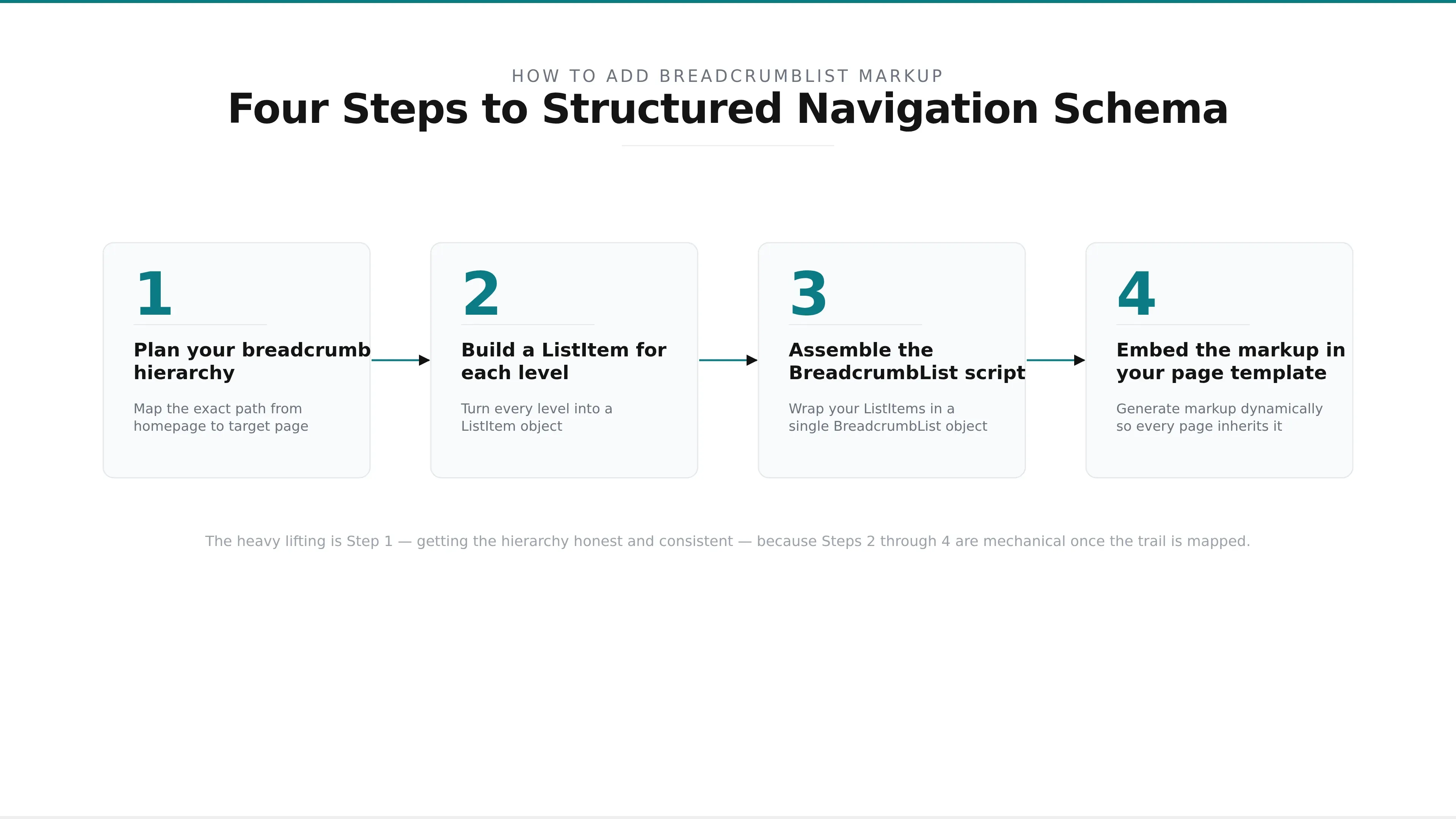
Adding breadcrumb markup takes four steps: map your site hierarchy for the page, build a ListItem for each level in order, wrap them in a BreadcrumbList JSON-LD script, and embed that script in the page template. Templates generate the markup dynamically so every page in a section inherits the pattern.
What you'll need
- A map of the page's position in your site hierarchy
- The canonical URL for each level in the trail
- Access to your page template or CMS theme files
- Google's Rich Results Test for validation
Plan your breadcrumb hierarchy.
Before writing any markup, map the exact path a user takes from your homepage to the target page. For an e-commerce category, that might be Home → Running Shoes → Trail Runners. For a blog, it's usually Home → Blog → Post Category → Article. Write down the name and canonical URL for each level. This trail must match what your visible navigation shows - the schema describes the real structure, it doesn't invent a new one.
Build a ListItem for each level.
Turn every level into a ListItem object with three properties. Position is its place in the trail, starting at 1 for the homepage and incrementing by one. Name is the label a reader sees. Item is the absolute URL of that level. The final item - the current page - is sometimes written without an item URL in newer implementations, but including its canonical URL remains the safest, most widely compatible approach.
Assemble the BreadcrumbList script.
Wrap your ListItems in a single BreadcrumbList object and place it inside a script tag typed as application/ld+json. A three-level product trail looks like this:
@context: "https://schema.org", @type: "BreadcrumbList", itemListElement: [ {@type: "ListItem", position: 1, name: "Home", item: "https://example.com/"}, {@type: "ListItem", position: 2, name: "Running Shoes", item: "https://example.com/running-shoes/"}, {@type: "ListItem", position: 3, name: "Trail Runners", item: "https://example.com/running-shoes/trail/"} ]
A blog trail follows the same shape - only the names and URLs change: Home, then Blog, then the post category, then the individual article at position 4.
Embed the markup in your page template.
You can hardcode the script on a single high-value page, but that doesn't scale. On any real site, generate it dynamically: have your template loop over the page's ancestors and output one ListItem per level, so every page in a section inherits correct markup automatically. Place the script in the page head or anywhere in the body - position on the page doesn't affect how crawlers read it. Hardcoding suits a one-off landing page; dynamic generation is the only sane option for a catalog or a growing blog.
That four-step sequence is the whole of a manual breadcrumb schema implementation. The heavy lifting is Step 1 - getting the hierarchy honest and consistent - because Steps 2 through 4 are mechanical once the trail is mapped.
Common Mistakes and Best Practices
The most common breadcrumb errors are mismatched hierarchy, missing or non-sequential position values, and item URLs that don't resolve. Each one either invalidates the markup or misrepresents your structure. The fix is discipline: keep the schema trail identical to your visible breadcrumbs, number positions from one without gaps, and use absolute canonical URLs.
Here are the errors we see most often, and how to avoid each:
- Mismatched hierarchy. The schema trail claims a path that doesn't match the visible breadcrumbs or the page's real location. Google treats the mismatch as a quality problem and may ignore the markup entirely.
- Missing or non-sequential positions. Positions must start at 1 and increment without gaps. Skipping from 1 to 3, or omitting position altogether, invalidates the list.
- Incorrect or relative URLs. The item value should be an absolute, canonical URL. Relative paths and non-resolving links break extraction.
- Wrong number of levels. Breadcrumbs should reflect actual depth. Padding the trail with fake levels to look deeper, or collapsing real ones, both misrepresent structure.
- Duplicate items. Each level appears once. Repeating a level confuses the ordering.
The best practices are the mirror image. Keep breadcrumb schema identical to the breadcrumbs a visitor actually sees; the two should never disagree. Order items from broadest (home) to most specific (current page). Use one canonical URL per level. And keep the trail as shallow as the real hierarchy allows - three to four levels is typical for most article and product pages.
Applying the same rules across every article type - blog posts, product pages, category hubs, comparison guides - is where a schema coverage checklist for article publishers earns its keep, because consistency across templates is what keeps a whole cluster eligible rather than a scattered handful of pages.
How Do You Validate BreadcrumbList Markup Before Publishing?
Validate breadcrumb markup before publishing with Google's Rich Results Test and the schema.org validator. Paste the URL or code, and the tools flag errors and warnings. Errors block rich-result eligibility and must be fixed; warnings are advisory. Invalid markup is silently ignored by crawlers, so pre-publish checks prevent quiet failures in the index.
Run every page through validation before it goes live. Google's Rich Results Test tells you whether the breadcrumb markup qualifies for enhanced display and lists any errors or warnings; the schema.org validator checks that your syntax and vocabulary conform to the standard. Validating before publishing prevents the errors that otherwise slip through, because crawlers don't announce failures - invalid markup is simply skipped.
Read the results by severity. Errors are blocking: a missing position, a malformed URL, or a property the type doesn't allow will keep the page out of rich-result eligibility until fixed. Warnings are advisory - recommended-but-optional fields that improve the markup without blocking it. For breadcrumbs specifically, valid markup that matches the site's actual hierarchy is the eligibility requirement for rich-result display, and that same structural clarity feeds AI answer-engine citation.
The catch with manual validation is that it's a per-page chore. Pasting each URL into two tools and interpreting the output is fine for one article; across a monthly cluster of ten, it becomes exactly the kind of friction that gets skipped under deadline - which is where automated validation earns its place.
SEO content that ranks, written and published for you
GetTraffic creates authority-building content clusters for your business. No writing, no freelancers, no content calendar. Agency-quality results at 91% less cost.
Start My Free TrialAutomating BreadcrumbList Generation in Your Workflow
Content platforms and CMS plugins can generate BreadcrumbList markup automatically from your site's hierarchy metadata, removing the manual, developer-dependent step. Instead of hand-coding a script per page, the system builds and validates the markup from the page's position in the structure and embeds it before publishing - so no page ships without a correct breadcrumb trail.
Manual and automated breadcrumb generation differ on more than speed:
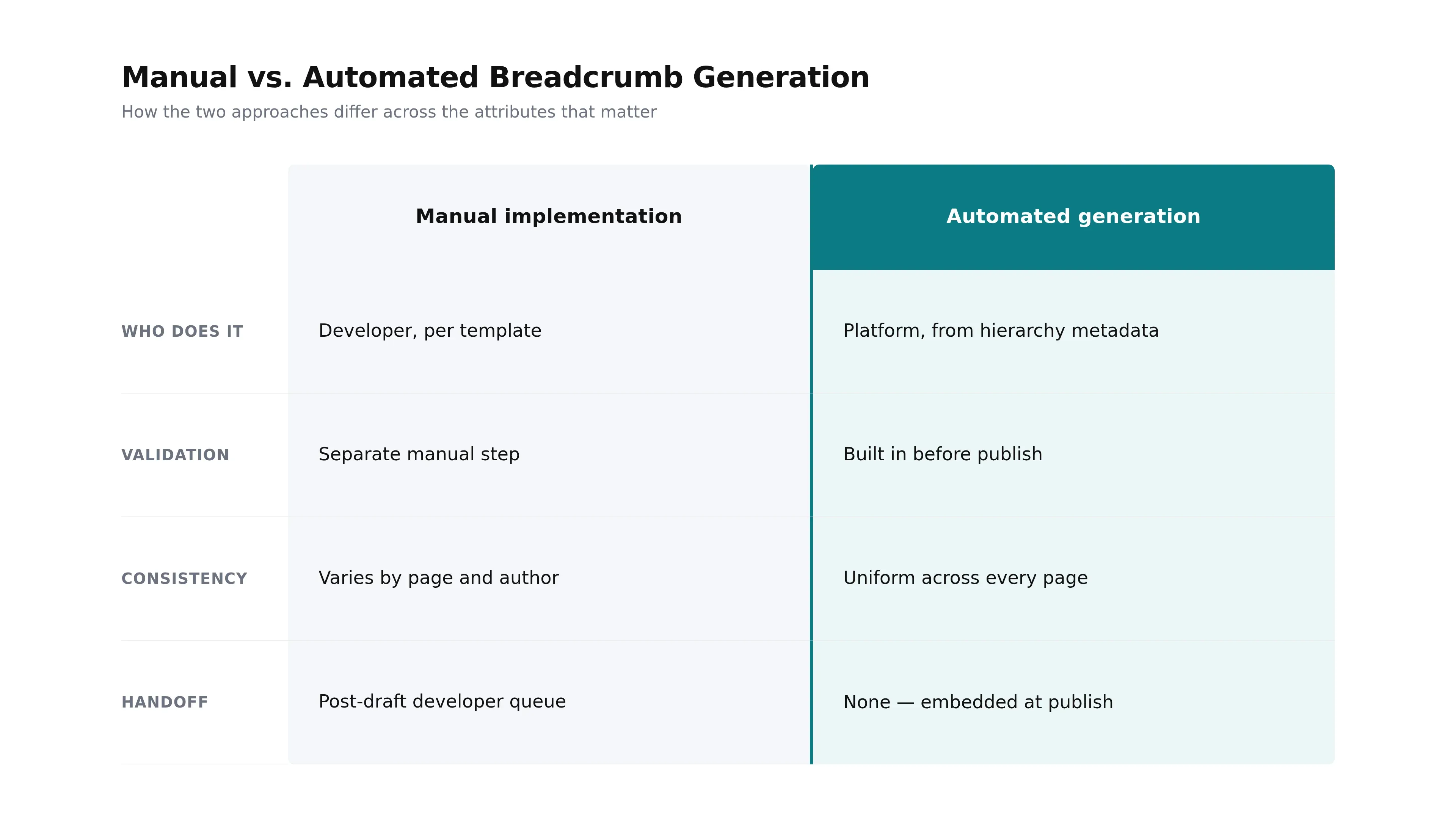
| Attribute | Manual implementation | Automated generation |
|---|---|---|
| Who does it | Developer, per template | Platform, from hierarchy metadata |
| Validation | Separate manual step | Built in before publish |
| Consistency | Varies by page and author | Uniform across every page |
| Handoff | Post-draft developer queue | None - embedded at publish |
Baseline plugins like Yoast SEO and Rank Math already generate BreadcrumbList markup from post metadata, which covers standard WordPress setups well. Purpose-built content platforms take it further, generating and pre-validating markup within the publishing workflow so it's embedded before an article ever reaches the CMS. That's the model GetTraffic uses across its cluster publishing: breadcrumb and article schema are built, validated against an automated quality check, and shipped with one-click publishing - no post-publish developer handoff.
For a team publishing a handful of pages a year, manual markup is fine. For anyone running content clusters at volume, automation is what turns breadcrumb schema from an optional afterthought into a standard, non-negotiable part of every page that ships.
Breadcrumblist schema does one specific job well: it turns your site's hierarchy into something search engines and AI answer engines can read and reuse. Get the structure right - ordered ListItems with clean positions, names, and canonical URLs - keep it identical to your visible breadcrumbs, and validate before you publish.
The implementation itself is straightforward; the real cost has always been the repetition. Doing it by hand on every page, validating each one, and waiting on a developer handoff is what stalls content pipelines. Whether you script it into your templates or let your publishing platform generate it automatically, the goal is the same: every page ships with a correct, validated breadcrumb trail, and you never think about it per-article again. Add breadcrumb markup to your highest-value pages first, then make it a default for everything that follows.
Frequently Asked Questions About BreadcrumbList Schema
What's the difference between BreadcrumbList schema and my visible breadcrumb navigation?
The visible breadcrumbs are the clickable trail your readers see; BreadcrumbList schema is the JSON-LD version that describes the same path to search engines and AI answer engines in machine-readable form. They should always match. The visible trail aids user navigation, while the schema lets crawlers reconstruct your hierarchy and display it in the result. You need both, and both must describe one identical path.
Do I still need Article or BlogPosting schema if I add BreadcrumbList markup?
Yes. BreadcrumbList handles site hierarchy, but it's usually deployed alongside Article or BlogPosting schema, which carries the headline, author, and publication date. The two describe different things and complement each other on the same page. For article publishers, breadcrumb plus article-level schema is the standard pairing, and adding Organization schema for publisher context rounds it out.
Which format should I use for breadcrumb markup - JSON-LD, Microdata, or RDFa?
JSON-LD. Google explicitly recommends it because it keeps structured data in a single script block, separate from your visible HTML. Microdata and RDFa embed markup directly into page elements, so updating them risks disturbing your layout. JSON-LD is safer to regenerate and far easier to deploy in template-driven workflows, which is why it dominates modern breadcrumb schema implementation.
How many levels should a breadcrumb trail have?
As many as your real hierarchy has - and no more. Most article and product pages run three to four levels, from the homepage down to the current page. Don't pad the trail with invented levels to look deeper, and don't collapse real ones. The schema should mirror the actual path a visitor takes, matching your visible breadcrumbs exactly.
Sources and Further Reading
Get your business on page 1 of Google
Get your business found on Google - SEO content written and published automatically.
Start My Free Trial7-day free trial